
This article documents my Kubernetes deployment of Cloudflare Tunnels to expose Linkding.
Cloudflare Tunnels#
It goes without saying that exposing services via node port + opening adjacent ports on WAN is incredibly insecure. Even with my exposed Docker services, I’ve used a DNAT rule to only forward HTTP/HTTPS traffic on the WAN from IPs on a custom GeoIP whitelist to a reverse proxy in my homelab.
So these services are only accessible via subdomains. But even then, my public IP is exposed. But there is a better way of exposing services to the internet, a way I’ve been aware of for a long time but have not tested until now.
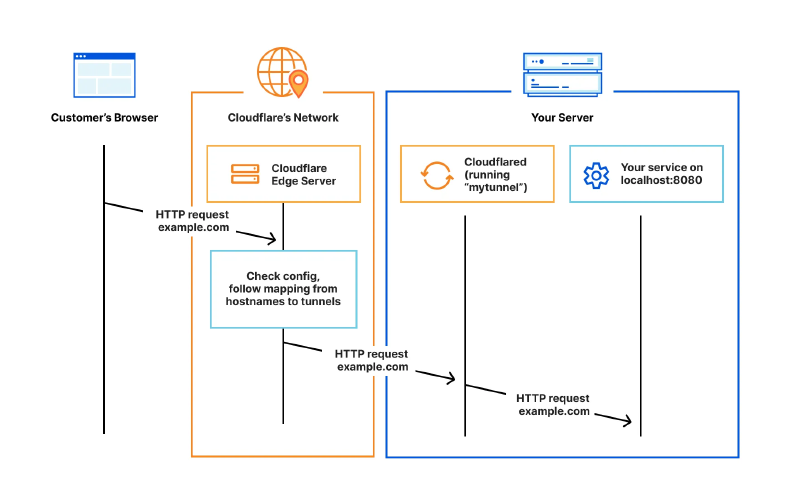
Cloudflare Tunnels provides a secure way to connect resources to Cloudflare without a publicly routable IP address. So traffic doesn’t need to be sent to an external IP. It works by using a lightweight daemon (cloudflared) to establish outbound-only connections referred to as tunnels between internal resources and Cloudflare’s global network.
Tunnels are persistent objects that route traffic to DNS records. A single tunnel can contain as many cloudflared processes as required, and these processes will establish connections to Cloudflare and send traffic to the nearest Cloudflare data centre.
Install and configuration#
https://developers.cloudflare.com/cloudflare-one/networks/connectors/cloudflare-tunnel/do-more-with-tunnels/local-management/create-local-tunnel/ Install cloudflared package on local machine:
pacman -Syu cloudflaredAuthenticate cloudflared. The command will open a browser, prompt you to log in to Cloudflare and specify a hostname. Once done, it will generate a json and cert.pem file. It also generates an ID which will be needed later.
cloudflared tunnel loginCreate a tunnel with the subdomain of the service:
cloudflared tunnel create ld # subdomain for linkdingCreate a CNAME record specifying the subdomain under name and {tunnel id}.cfargotunnel.com under target, with proxy status ticked:
http://59c97568-9eda-4dbf-9857-b6cf9cf91259.cfargotunnel.com/Kubernetes setup#
The json file generated above contains credentials cloudflared will need to authenticate with Cloudflare. The default K8s docs have deployment examples with hard-coded sensitive credentials, which is a no-go.
Created a secret using “kubectl create secret generic” (example ID below), created a secret volume and mounted it to the cloudflared container:
kubectl create secret generic tunnel-credentials \
--from-file=credentials.json=59c97568-9eda-4dbf-9857-b6cf9cf91259.jsonCloudflare.yaml
apiVersion: apps/v1
kind: Deployment
metadata:
  name: cloudflared
spec:
  selector:
    matchLabels:
      app: cloudflared
  replicas: 2
  template:
    metadata:
      labels:
        app: cloudflared
    spec:
      containers:
      - name: cloudflared
        image: cloudflare/cloudflared:latest
        args:
        - tunnel
        - --config # Points cloudflared to the config file, which configures what cloudflared will actually do (ConfigMao)
        - /etc/cloudflared/config/config.yaml
        - run
        livenessProbe:
          httpGet:
            path: /ready # Cloudflared has a /ready endpoint which returns 200 if and only if it has an active connection to the edge.
            port: 2000
          failureThreshold: 1
          initialDelaySeconds: 10
          periodSeconds: 10
        volumeMounts:
        - name: config
          mountPath: /etc/cloudflared/config
          readOnly: true

        - name: creds # Each tunnel has an associated "credentials file" which authorizes machines to run the tunnel.
                      #cloudflared will read this file from its local filesystem and it'll be stored in a k8s secret.
          mountPath: /etc/cloudflared/creds
          readOnly: true
      volumes:
      - name: creds
        secret:
          secretName: tunnel-credentials

      # Create a config.yaml file from the ConfigMap below.
      - name: config
        configMap:
          name: cloudflared
          items:
          - key: config.yaml
            path: config.yaml


---
apiVersion: v1
kind: ConfigMap
metadata:
  name: cloudflared
data:
  config.yaml: |
    # Name of the tunnel you want to run

    tunnel: ld

    credentials-file: /etc/cloudflared/creds/credentials.json

    # Serves the metrics server under /metrics and the readiness server under /ready
    metrics: 0.0.0.0:2000
    no-autoupdate: true

    ingress:
    - hostname: ld.ksefuke-labs.com
      service: http://linkding:9090

    # This rule sends traffic to the built-in hello-world HTTP server. This can help debug connectivity
    # issues. If hello.example.com resolves and tunnel.example.com does not, then the problem is
    # in the connection from cloudflared to your local service, not from the internet to cloudflared.
    - hostname: hello.example.com
      service: hello_world
    # This rule matches any traffic which didn't match a previous rule, and responds with HTTP 404.
    - service: http_status:404

# This ConfigMap is just a way to define the cloudflared config.yaml file in k8s.
# It's useful to define it in k8s, rather than as a stand-alone .yaml file, because
# this lets you use various k8s templating solutions (e.g. Helm charts) to
# parameterize your config, instead of just using string literals.
Closing Thoughts#
I think Cloudflare Tunnels is a fantastic method of securely exposing services. But I would like to try a similar self-hosted solution called Pangolin. It requires a VPS, but has extensions like CrowdSec IDS/IPS, SSO and 2FA to further control access to apps.
I still plan to use Cloudflare Tunnels for some apps in the future.
Beats to Listen to#
Windows96 - Empty Hiding World
Windows96 is known for his funky tunes themed around old school Windows aesthetics. Definitely won’t be many people’s cup of tea, but I find his tunes quite charming.
Personal Favourites: Edenic Green Plus, Extreme Violet, Reason Why, Inwite, Continuing