
I’m no stranger to the linux terminal. I’ve been daily driving arch linux derivatives like Manjaro, Endeavour OS and recently Cachy OS for almost 4 years now. But have never really played with the source. Too scared i would miss something crucial in the install and suffer the consequences days later. Finally had proper go with assistance from Kubecraft and a spare laptop previously running Pop OS
Hardware Specs:
- Laptop Model: Dell Latitude E7450
- CPU: Intel Core I5 5330u
- Memory: 8GB
- Disk: Samsung 850 EVO 256GB SSD
- System Configuration: UEFI x64 | LVM on LUKS | Systemd-boot | KDE
Boot Mode#
Verifying Boot Mode to confirm UEFI x64 is in use, UEFI x32 has increasingly limited software/boot support and shouldn’t be used on hardware newer than 2009/2013. More details available here
cat /sys/firmware/efi/fw_platform_sizeInternet Connectivity#
Connected to wlan0 to TPLINK_OC4D via iwctl, which manipulates iwd
iwctlEntered following commands within the interactive prompt to connect to WIFI
device list
station wlan0 scan
station wlan0 connect TPLINK_OC4D
exit
Verified Internet Connectivity by pinging “ping.archlinux.org” or “station wlan0” in iwctl
ping ping.archlinux.orgUsed timedatectl to set correct timezone, default setting was an hour behind
timedatectl list-timezones
timedatectl set-timezone Europe/London
System can now be accessed via ssh once a root password is set, default config settings allow root password login
Disk Partitioning#
- A boot, root and optionally a swap partition need to be created
- Queried visible drives with lsblk
- Used fdisk to partition 1gb for boot partition and set file type to efi, used remaining disk space for second partition for root
# fdisk interactive prompt
# m select partition, first and last sector used
# t select file type
# p print out partition layout
# w confirm and write changes to diskEncryption#
Following on from kubecraft classroom, i setup full disk encryption including boot partition via LVM on LUKS using the diagram below as a reference I would personally setup disk encryption just for the home dir on a personal desktop, limine encryption support will determine if this or full disk encryption will be done
Would do full encryption on a laptop or work installation though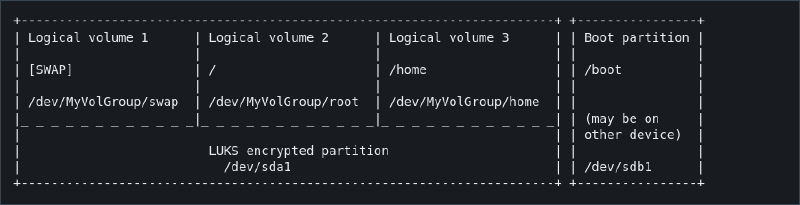
# Create the LUKS encrypted container at the designated partition. Enter the chosen password twice
cryptsetup luksFormat /dev/sda2
# Open/Unlock container
cryptsetup open /dev/sda2 cryptlvmLVM#
Using LVM allows for easier management of the drives over formatting drives directly with a filesystem i.e ext4, xfs or btrfs. https://wiki.archlinux.org/title/Dm-crypt/Encrypting_an_entire_system#Preparing_the_logical_volumes
# Create a physical volume on top of the opened LUKS container
pvcreate /dev/mapper/cryptlvm
# Create a volume group (in this example named `echo`, but it can be whatever you want) and add the previously created physical volume to it:
vgcreate echo /dev/mapper/cryptlvm
# Create all your logical volumes on the volume group
lvcreate -L 4G -n swap echo
lvcreate -L 32G -n root echo
lvcreate -l 80%FREE -n home echo
Created required filesystems
mkfs.ext4 /dev/echo/root
mkfs.ext4 /dev/echo/home
mkswap /dev/echo/swap
Mounted filesystems to chroot folder (don’t forget home directory)
mount /dev/echo/root /mnt
mount --mkdir /dev/echo/home /mnt/home
swapon /dev/echo/swap
Configured and mounted boot partition
mkfs.fat -F32 /dev/sda1
mount --mkdir /dev/sda1 /mnt/boot
System Configuration#
Installed essential packages to chroot folder
pacstrap -K /mnt base linux linux-firmwareUsed “genfstab” to generate fstab records for booting
genfstab -U /mnt >> /mnt/etc/fstabRecords in “/etc/fstab”
# /dev/mapper/echo-root
UUID=b38f1acb-7d94-4afd-84dd-f9af7d41a58e       /               ext4            rw,relatime     0 1

# /dev/sda1
UUID=6451-8F86          /boot           vfat            rw,relatime,fmask=0022,dmask=0022,codepage=437,iocharset=ascii,shortn>

# /dev/mapper/echo-home
UUID=dd9e2e20-bb83-4faa-8f4a-bd67caefd5c6       /home           ext4            rw,relatime     0 2

# /dev/mapper/echo-swap
UUID=c55d8326-4ece-449e-96ef-a2a18d8ee456       none            swap            defaults        0 0
Chrooted into install
arch-chroot /mntTime and localization#
Set correct timezone via symlink:
ln -sf /usr/share/zoneinfo/Europe/London /etc/localtimeUsed hwclock to generate /etc/adjtime
hwclock --systohcUn-commented US and GB locale values in “/etc/locale.gen” and ran “locale-gen”. Copied from Cachyos install (variables pulled from calamere installer)
en_GB.UTF-8 UTF-8
en_US.UTF-8 UTF-8
Copied Language variables from cachyos “/etc/locale.conf”
LANG=en_GB.UTF-8
LC_ADDRESS=en_GB.UTF-8
LC_IDENTIFICATION=en_GB.UTF-8
LC_MEASUREMENT=en_GB.UTF-8
LC_MONETARY=en_GB.UTF-8
LC_NAME=en_GB.UTF-8
LC_NUMERIC=en_GB.UTF-8
LC_PAPER=en_GB.UTF-8
LC_TELEPHONE=en_GB.UTF-8
LC_TIME=en_GB.UTF-8
Set console keyboard layout to US in “/etc/vconsole.conf”
KEYMAP=usSet hostname to “arch-kubecraft” in “/etc/hostname”
Networking#
Networking in the guide is done with systemd-networkd
systemctl enable systemd-networkd.service
systemctl enable systemd-resolved.service
Created the following file in “/etc/systemd/network/25-wireless-network”
[Match]
Name=wlan0

[Network]
DHCP=yes
IgnoreCarrierLoss=3s
Followed by installing and enabling iwd
pacman -S iwd
systemctl enable iwd.service
Configuring mkinitcpio#
mkinitcpio is a Bash script used to create initramfs images, which is a temp root file system used during the boot process of Linux systems, allowing the kernel to load necessary drivers and mount the real root file system Amended “/etc/mkinitcpio.conf” to include the following:
HOOKS=(base **systemd** autodetect microcode modconf kms **keyboard** **sd-vconsole** block **sd-encrypt** **lvm2** filesystems fsck)Regenerated initarmfs with “mkinitcpio -P” after making sure “linux and lvm2 were installed.
Bootloader#
Insert post > BIOS > Bootloader picture What is a bootloader Systemd loader needs to reference a file which contains the linux kernel (vmlinuz-linux) and initramfs-linux.img generated by mkinitpcio
As of 23/10/25 bootctl needs to run outside chroot to work properly
bootctl --esp-path=/mnt/boot install
arch-chroot /mnt
bootctl install
/boot/loader/entries/arch.conf template with decryption instructions taken from wiki
title   Arch Linux
linux   /vmlinuz-linux
initrd  /initramfs-linux.img
options rd.luks.name=device-UUID=cryptlvm(or MyVolgroup name if renamed) root=/dev/MyVolGroup/root rw
My file which references the root encrypted container device lvm is deployed on top of (i.e /dev/sda2) pulled via “blkid”, and the root directory within the lvm volumes
title   Arch Linux
linux   /vmlinuz-linux
initrd  /initramfs-linux.img
options rd.luks.name=163bdea6-6c73-4708-a6f4-848c4fdfb4eb=echo root=/dev/echo/root rw
Normal User Creation#
Created a “echo” user via useradd and give it sudo permissions and a password. User -m argument to autocreate home directory
useradd -m echo
usermod -aG wheel echo
passwd echo
Uncomment %wheel ALL=(ALL) ALL from sudo file with “EDITOR= visudo”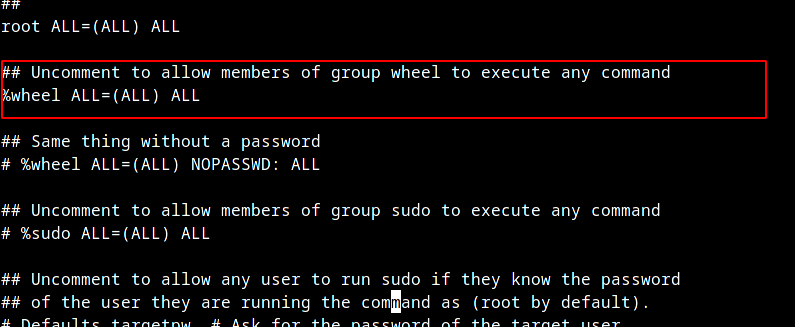
Verify sudo is working with normal user
su - echo
id
sudo whoami
Desktop Environment#
I would personally use a window manager like hyprland, but installed the KDE desktop environment for simplicity
sudo pacman -Syu # Updates mirrors and installed packages
sudo pacman -S plasma-meta sddm # Installs KDE deskop environment
sudo pacman -S sddm # Installs SDDM (Graphical Login Program)
sudo systemctl enable sddm.service # Set sddm to launch on system startup
sudo systemctl start sddm.service # Starts sddm
Additional Goals for Setup#
I’m quite comfortable with cachy os on my main rig using Limine Bootloader and BTRFS filesystem for native snapshots support while booting (absolute lifesaver). But i do have a couple of things i would want to try on a new installation:
- Limine boot support for secure boot and encrypted btrfs subvolumes
- Reflector script to update package repo’s with fatest sources
- Learn vim
- Frequently investigating results of arch-audit
- Considering blacklisting certain files from BTRFS/ZFS Snapshot to preventing mismanagement of sensitive data snapshot
- Test Install of minimal fedora with Cachy OS optimizations