
I’m no stranger to the linux terminal. I’ve been daily driving arch linux derivatives like Manjaro, Endeavour OS and recently Cachy OS for almost 4 years now. But have never really played with the source, finally had proper go with a spare laptop.
Hardware Specs:
- Laptop Model: Dell Latitude E7450
- CPU: Intel Core I5 5330u
- Memory: 8GB
- Disk: Samsung 850 EVO 256GB SSD
- System Configuration: UEFI x64 | LVM on LUKS (Ext4) | Mkinitcpio | Systemd-boot | Systemd-networkd
- Desktop Environment: KDE Plasma
Boot Mode#
Verifying Boot Mode to confirm UEFI x64 is in use, UEFI x32 has increasingly limited software/boot support and shouldn’t be used on hardware newer than 2009/2013. More details available here.
cat /sys/firmware/efi/fw_platform_sizeInternet Connectivity#
Connected to wlan0 to TPLINK_AP via iwctl, which manipulates iwd.
iwctlEntered following commands within the interactive prompt to connect to WIFI.
device list
station wlan0 scan
station wlan0 connect TPLINK_AP
exit
Verified Internet Connectivity by pinging ping.archlinux.org or using station wlan0 in iwctl CLI.
ping ping.archlinux.orgUsed timedatectl to set correct timezone, default setting was an hour behind.
timedatectl list-timezones
timedatectl set-timezone Europe/London
System can now be accessed via ssh once a root password is set, default config settings allow root password login.
Disk Partitioning#
- A boot, root and swap partition (optional) need to be created
- Queried visible drives with lsblk
- Used fdisk to partition 1gb for boot partition and set file type to efi, used remaining disk space for second partition for root
# fdisk interactive prompt
# m select partition, first and last sector used
# t select file type
# p print out partition layout
# w confirm and write changes to diskEncryption#
I setup full disk encryption including the boot partition via LVM on LUKS using the diagram below as a reference. It’s something i’ve never done before but definitely will going forward, especially with work devices.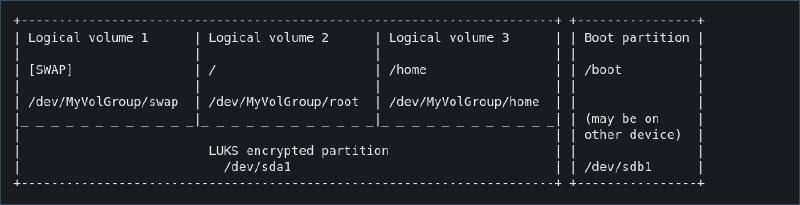
# Create the LUKS encrypted container at the designated partition. Enter the chosen password twice
cryptsetup luksFormat /dev/sda2
# Open/Unlock container
cryptsetup open /dev/sda2 cryptlvmLVM#
Using LVM allows for easier management of the drives versus formatting drives directly with a filesystem.
# Create a physical volume on top of the opened LUKS container
pvcreate /dev/mapper/cryptlvm
# Create a volume group (in this example named `echo`, but it can be whatever you want) and add the previously created physical volume to it:
vgcreate echo /dev/mapper/cryptlvm
# Create all required logical volumes on the volume group
lvcreate -L 4G -n swap echo
lvcreate -L 32G -n root echo
lvcreate -l 80%FREE -n home echo
Created required filesystems.
mkfs.ext4 /dev/echo/root
mkfs.ext4 /dev/echo/home
mkswap /dev/echo/swap
Mounted filesystems to chroot folder (don’t forget home directory).
mount /dev/echo/root /mnt
mount --mkdir /dev/echo/home /mnt/home
swapon /dev/echo/swap
Configured and mounted boot partition.
mkfs.fat -F32 /dev/sda1
mount --mkdir /dev/sda1 /mnt/boot
System Configuration#
Installed essential packages into chroot folder.
pacstrap -K /mnt base linux linux-firmwareUsed genfstab to generate fstab records for mounting all the disk.
genfstab -U /mnt >> /mnt/etc/fstabRecords in /etc/fstab.
# /dev/mapper/echo-root
UUID=b38f1acb-7d94-4afd-84dd-f9af7d41a58e       /               ext4            rw,relatime     0 1

# /dev/sda1
UUID=6451-8F86          /boot           vfat            rw,relatime,fmask=0022,dmask=0022,codepage=437,iocharset=ascii,shortn>

# /dev/mapper/echo-home
UUID=dd9e2e20-bb83-4faa-8f4a-bd67caefd5c6       /home           ext4            rw,relatime     0 2

# /dev/mapper/echo-swap
UUID=c55d8326-4ece-449e-96ef-a2a18d8ee456       none            swap            defaults        0 0
Chrooted into install.
arch-chroot /mntTime and localization#
Set correct timezone via symlink:
ln -sf /usr/share/zoneinfo/Europe/London /etc/localtimeUsed hwclock to generate /etc/adjtime file.
hwclock --systohcUn-commented US and GB locale values in /etc/locale.ge and ran locale-gen. Copied from my desktop Cachyos install (variables pulled from calamere installer).
en_GB.UTF-8 UTF-8
en_US.UTF-8 UTF-8
Copied Language variables from cachyos /etc/locale.conf
LANG=en_GB.UTF-8
LC_ADDRESS=en_GB.UTF-8
LC_IDENTIFICATION=en_GB.UTF-8
LC_MEASUREMENT=en_GB.UTF-8
LC_MONETARY=en_GB.UTF-8
LC_NAME=en_GB.UTF-8
LC_NUMERIC=en_GB.UTF-8
LC_PAPER=en_GB.UTF-8
LC_TELEPHONE=en_GB.UTF-8
LC_TIME=en_GB.UTF-8
Set console keyboard layout to US in /etc/vconsole.conf.
KEYMAP=usSet hostname to “arch-dev” in /etc/hostname.
Networking#
Networking in the guide is done with systemd-networkd
systemctl enable systemd-networkd.service
systemctl enable systemd-resolved.service
Created the following file in /etc/systemd/network/25-wireless-network.
[Match]
Name=wlan0

[Network]
DHCP=yes
IgnoreCarrierLoss=3s
Followed by installing and enabling iwd.
pacman -S iwd
systemctl enable iwd.service
Configuring mkinitcpio#
Mkinitcpio is a bash script used to create initramfs images, which is a temp root file system used during the boot process of Linux systems, allowing the kernel to load necessary drivers and mount the real root file system.
Amended /etc/mkinitcpio.conf to include the following:
HOOKS=(base **systemd** autodetect microcode modconf kms **keyboard** **sd-vconsole** block **sd-encrypt** **lvm2** filesystems fsck)Regenerated initarmfs with mkinitcpio -P after making sure linux and lvm2 were installed.
Bootloader#
A bootloader is a piece of software started by firmware, it is responsible for loading the kernel, kernel parameters and any external initramfs images. I will be using systemd-boot as not a fan of grub (One to many mornings started with a minimal grub config screen.)
Systemd-boot needs to reference a file which contains the linux kernel (vmlinuz-linux) and initramfs-linux.img generated by mkinitpcio.
bootctl --esp-path=/mnt/boot install
arch-chroot /mnt
bootctl install
/boot/loader/entries/arch.conf template with decryption instructions taken from wiki
title   Arch Linux
linux   /vmlinuz-linux
initrd  /initramfs-linux.img
options rd.luks.name=device-UUID=cryptlvm(or MyVolgroup name if renamed) root=/dev/MyVolGroup/root rw
My file which references the root encrypted container device lvm is deployed on top of (i.e /dev/sda2) pulled via “blkid”, and the root directory within the lvm volumes.
title   Arch Linux
linux   /vmlinuz-linux
initrd  /initramfs-linux.img
options rd.luks.name=163bdea6-6c73-4708-a6f4-848c4fdfb4eb=echo root=/dev/echo/root rw
Normal User Creation#
Created a “echo” user via useradd and give it sudo permissions and a password. User -m argument to autocreate home directory.
useradd -m echo
usermod -aG wheel echo
passwd echo
Uncomment %wheel ALL=(ALL) ALL from sudo file with EDITOR= visudo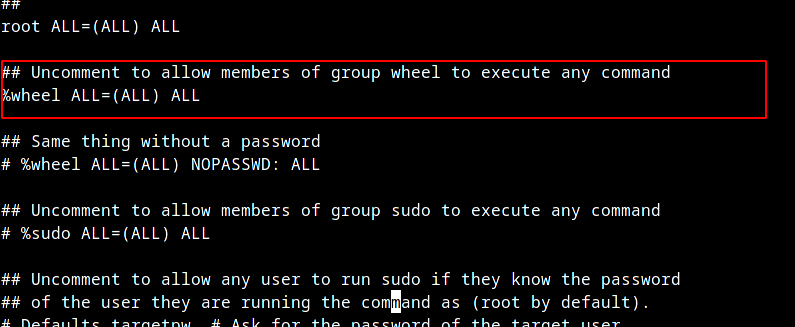
Verify sudo is working with normal user.
su - echo
id
sudo whoami
Desktop Environment#
I would personally use a window manager like hyprland, but installed the KDE desktop environment for simplicity.
sudo pacman -Syu # Updates mirrors and installed packages
sudo pacman -S plasma-meta sddm # Installs KDE deskop environment
sudo pacman -S sddm # Installs SDDM (Graphical Login Program)
sudo systemctl enable sddm.service # Set sddm to launch on system startup
sudo systemctl start sddm.service # Starts sddm
Closing Thoughts#
It’s been fun to finally tackle a CLI install of Arch Linux, it’s not as scary as i thought and defintely setup a custom system at some point.
For the time being i’m quite comfortable with cachy os on my main rig using Limine Bootloader and BTRFS filesystem for native snapshots support while booting (absolute lifesaver). But i do have a couple of things i would want to try on a new installation:
- Limine boot support for secure boot and encrypted btrfs subvolumes
- Reflector script to update package repo’s with fastest sources periodically
- To learn vim
- Frequently audit system config and installed packages
- Considering blacklisting certain files from BTRFS Snapshot to preventing mismanagement of sensitive data.
Beats to listen to#
A.L.I.S.O.N - Derniere Ride
Perfect tune to match the chaos and pandemonium of R4E1 Runs (If you know, you know. If not, be greatful)